Keep everything. Just smaller.
Free up space on your computer without deleting a thing. Shrink Wizard shrinks your apps, files and photos in place. They open exactly as before, and you can undo it anytime.
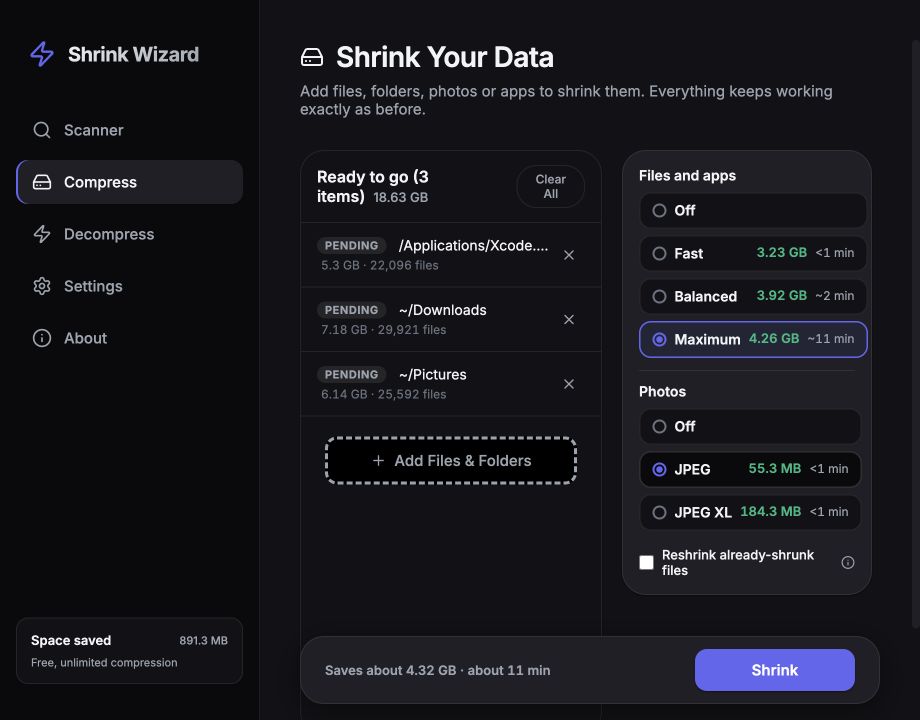
Magic under the hood.
Simple on the outside.
No complex settings required. Just drop your files and watch your free space grow.
Drop Your Files
Drag and drop folders, documents, photos, or entire game directories into the app.
Smart Analysis
Shrink Wizard finds the best way to shrink each file, and leaves alone anything that wouldn't get smaller.
Reclaim Space
Files are shrunk in place. They look and act exactly the same, but take up less space.
Smaller Files. Nothing Else Changes.
Your files open and work exactly as before.
Works Everywhere, Like Before
Shrunk files open in every app, just like before. Your computer unpacks them on the fly, with nothing extra to install, and they keep working even if you uninstall Shrink Wizard.
See Your Savings First
Scan a folder, or your whole drive, and Shrink Wizard shows how much space you'll get back before it changes anything.
Shrink Windows Itself
Windows can compress its own system files too, a feature Microsoft built for laptops with small drives. Shrink Wizard turns it on, or back off, for you.
Smaller Photos, Same Pixels
JPEG photos are repacked more efficiently without changing a single pixel. They stay ordinary JPEGs, with their date, camera details and colors intact.
Photo Archives
You can choose to convert JPEGs to JPEG XL, a new format that is around 20% smaller. Not all apps support JPEG XL, but Shrink Wizard can reconstruct the original, pixel for pixel, at any time.
Undo Anytime
Want to remove Shrink Wizard's compression? Decompress, for free, anytime.
Free. No Limits.
All the features. No account, license key or subscription.
Free
Everything included, on all your computers.
- Shrink apps, files and photos
- Full speed, never slowed down
- Unlimited compression, with no daily limits
- No account or license key required
- Undo anytime, free
- Files keep working, even if you uninstall
Frequently Asked Questions
Ready to reclaim your disk space?
Download Shrink Wizard today and see how much space you can save.